

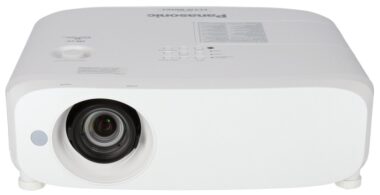
The Panasonic PT-VX610 XGA Projector (1920 x 1200 pixel) resolution native to the PT-VZ585N/VZ580/VZ470 brings crisp HD to meeting spaces and classrooms for immersive viewing. The Panasonic PT-VX610 XGA Projector, with brightness of 5500lm*1 and a class-leading 16,000:1 contrast ratio*2, the PT-VX610 treats one to vivid colours, inky blacks, pure highlights, and clearly legible text reproduction even in bright conditions.
*1 For PT-VW545N/VW540/VX615N/VX615. PT-VZ585N/VZ580 features 5,000lm and PT-VZ470 features 4,400lm of brightness. *2 Excluding PT-VZ470. PT-VZ470 features 10,000:1 contrast ratio.
Correct slight colour variations in the reproduction range of individual units set up for multi-projection and is particularly useful for side-by-side configurations delivering ultra-wide-screen pictures. Large images can be seamlessly presented in auditoriums and boardrooms.

* Excluding PT-VZ470.
The Panasonic PT-VX610 XGA Projector requires less maintenance which is not only good for your budget, but also the environment. The air filter replacement cycle is at a class-leading 7,000 hours, and the unit can be washed and reused twice*1 to minimize waste. Lamp life is also pushed out to 7,000 hours in ECO2 mode*2, meaning part refreshment can be performed together with filter maintenance to reduce downtime.
*1 Filter replacement cycle is calculated based on time when projector’s built-in sensor detects clogging and powers projector down. Please follow the procedures listed in the operating instructions when washing the filter with water. Replacement is recommended after filter has been washed and reused twice or if filter is not sufficiently clean after washing. Filter replacement cycle is a guideline and may be reduced depending on environmental conditions. PT-VZ470’s filter cannot be washed with water. *2 Maximum value with Lamp Mode set to ECO2. 5,000 hours in Normal Mode and 6,000 hours in ECO1 Mode (7,000 hours in ECO Mode, 5,000 hours in Normal Mode for PT-VZ470). Lamp replacement cycle is a guideline and may be reduced depending on environmental conditions.
Panasonic technology assures sharp and comfortably viewed images for your Panasonic PT-VX610 WUXGA Projector, even with the blinds open by enhancing fine details (particularly in dark areas of the image) that are normally difficult to see in bright rooms. A built-in sensor measures ambient light while Daylight View Basic adjusts halftone colour and brightness to suit ambient illumination*.
* With Daylight View Basic set to AUTO mode.


Technologies combine to keep noise levels down to just 29 dB*, so the sound of the cooling fan is less distracting. This helps to keep attention focused on the presentation and quiet video scenes.
* With Lamp Mode set to ECO2. 37 dB in Normal and 35 dB in ECO1 Mode. Operating noise for PT-VZ470 is 29 dB (ECO Mode) and 37 dB (Normal Mode).

Supported on Windows® PCs and Android™ devices, next-generation Miracast is a low-latency protocol that provides high-bandwidth mirroring of video, stills, and web content with fast connection and a range of exclusive and practical features for users.
Miracast supports stutter-free audio and Full HD video transmission from device to projector screen at 1:1.

Easily control how content on your device is displayed on the big screen by selecting the appropriate mode.

To ensure confidential information isn’t mistakenly transmitted to another display, users can enter a PIN code before casting media via Miracast.
Compared to Miracast on legacy models, these current-generation projectors cut connection time by about a third, and increase connectivity ratio by almost a half.
Selectable 5 GHz/2.4 GHz channels are offered to provide a stable connection in rooms with network congestion or radio interference.
Three modes allow the meeting chair to choose which participants’ devices may display content or present content uninterrupted over Miracast. Interactive mode enables open chairing.

Panasonic offers free applications for smartphones, tablets, and personal computers enabling 3-step connection to get your media on the big screen swiftly and easily. Further, a new plug-and-share feature allows your to cast from PC without software or driver installation.

Insert a USB memory device into the projector port. In less than a minute, configuration setting files and an application are copied. Plug the USB memory device into your PC, click the player icon, and transmit video and stills wirelessly to the projector—no software or network setup required.
Note: When using Plug and Share software, images are projected with 1280 x 800 dots or 1024 x 768 dots onto the screen.

Included Panasonic Wireless Manager software for Mac and Windows® PC lets you cast media from the screen of your computer via wireless LAN with a host of display options right at your fingertips.
Note: When using Wireless Manager software, images are projected with 1280 x 800 dots or 1024 x 768 dots onto the screen.
Dedicated apps for iOS and Android™ devices feature simple 3-step initial connection and support a variety of media and business document transmission. These apps also allow SSID and key information to be easily obtained via a QR Code that’s projected on a standby screen, again saving on setup time.
Note: When using the Wireless Projector app, display resolution differs depending on your iOS/Android device and the display device. The maximum supported display resolution is WXGA (1280 x 800).
Supporting a full suite of features and eliminating the need for software installation, the Easy Wireless Stick dongle lets you plug and project from PC. After one-time initial setup, projection is automatic, and the device will display images from up to 16 computers at once, and is compatible with Windows® 10.

* Availability of the ET-UW100 Easy Wireless Stick varies depending on country.
* Requires a firmware update.
Applications for PC, iOS, Android, and the optional Easy Wireless Stick dongle support Multi-Projector Mode. This function enables media display from up to 16 different devices in split-screen configuration. You can also transmit content from one PC to up to eight projectors or displays.

* The number of windows that can be projected simultaneously varies depending on application used. Please refer to operating instructions for the application.
DIGITAL LINK transmits uncompressed video, audio*1, and control commands through a single CAT 5e or higher STP cable for distances of up to 150 m (492 ft)*2. Optional DIGITAL LINK Switcher or Digital Interface Box further simplifies installation, reduces cabling and associated costs, and enhances reliability.

*1 Audio transmission depending on model’s audio capability.
*2 150 m (492 ft) transmission available only with ET-YFB200G DIGITAL LINK Switcher for signals up to 1080p.
You don’t need a computer to start presenting—just insert a USB memory device containing media and start projecting straight away. This includes Full HD video as well as still images. A simple Graphical User Interface (GUI) assures a smooth and stress-free presentation.
Only authenticated users can connect to the IEEE802.1X network (EAP* over LAN), preventing access by unauthorized users. Compatible projectors support IEEE802.1X protocol over wired or wireless LAN.
* EAP: Extensible Authentication Protocol.
Zoom lens allows you to project from wide range of distances from tabletops or ceiling. Use vertical lens shift to quickly adjust image position without distortion.

* 40 % for PT-VX615N/VX610.
Note: Diagram for PT-VZ585N/VZ580 shown.
The Panasonic PT-VX610 XGA Projector filter will have to be replaced via the side and the lamp from the top of the projector. There’s no need to remove the unit from its ceiling mount for periodic maintenance.
Images are automatically* rotated depending on installation orientation—upside down on the ceiling or set on a table—using a built-in angle sensor.

* Manual setting also available per setup menu.

Horizontal, vertical and corner keystone correction adjusts the image shape for clear visibility while projecting off-axis or from an unusual angle. Curved Screen Correction allows for the projection of natural, distortion-free images onto curved or cylindrical surfaces.

* Excluding PT-VZ470.
Install Wireless Manager software on your PC, connect computer and projector with a USB cable*, and Wireless Manager will automatically start up and output media (including audio) to the projector.
* One-time USB driver installation is required upon initial USB cable connection. Supports Windows® PC only. Function is not available on Windows® 10.
For any further information or requirements, please complete the form below. Alternatively please contact us on:
Tel: +27 11 462 8647
Fax: +27 86 694 4682
e-Mail: info@panoramix.co.za
© Panoramix. All Rights Reserved | Website designed by Crockett Produced
